Secret Agent Kernel: From DIY Chatbot to a Semantic Orchestrator

Chat GPT generated poster inspired by the Johnny Rivers hit Secret Agent Man

A few months back, I began exploring how to build a movie-themed chatbot. The idea was simple: create a web API that could be connected to a chatbot front end and enable users to hold real conversations about movies, interacting with a Semantic Search API I’d previously built (the BONO Search API). I started with the basics: natural language queries, a .NET backend, and a connection to Azure OpenAI.

The first incarnation of my API, called RobotoAPI, worked by using a manually written Orchestrator. Its job was to steer each user query toward an appropriate response from GPT-4, either by injecting relevant plot data into the LLM’s context window using Retrieval Augmented Generation (RAG), or by gracefully providing a fallback response if the user wandered too far off topic. Getting a response from the LLM was (thanks to Azure OpenAI) the easiest part. The real challenge was in managing large chunks of context, anticipating the many directions a conversation might go, and engineering prompts robust enough to handle it all. It took several iterations before I landed on something that felt “conversational.”

To create a more natural, conversational flow, I brought in Redis to store and retrieve chat history. This allowed the API to “remember” past queries and responses, simulating a true back-and-forth conversation.

As a learning exercise, the project was hugely valuable. But even as RobotoAPI became more capable, I realized my approach wouldn’t scale cleanly. Each new conversation pattern meant more tangled code, and my orchestrator was starting to feel like a bottleneck.

That’s when I heard about Semantic Kernel, an open source library from Microsoft designed to make it easier to compose and orchestrate LLM-powered agents. I decided to check out Microsoft’s official learning path, and it turned out to be a fantastic introduction to not just the library itself, but to the concepts behind building agentic, modular chat systems. Semantic Kernel solved all the limitations I’d run into when building the RobotoAPI, and gave me a much cleaner foundation for what came next.

What is an Agentic System?

At its core, an agentic system is about giving a large language model more autonomy. Instead of just using the LLM to generate text, we treat it as a “reasoning engine” that can make decisions and take actions. The word “autonomy” is used quite often to describe an agentic system but what does that exactly mean?

Think of it like this:

  • A simple RAG system is like a helpful librarian. You ask a question, and they go to a specific shelf (the “strategy”), pull out a book (the “data”), and give it to you to find the answer.
  • An agentic system is like a team of expert researchers. You give them a complex question, and they work together to solve it. One researcher might be an expert in finding sources, another in analyzing data, and a third in synthesizing the final report. They can talk to each other, share information, and adapt their plan as they go. In an agentic system, we give the LLM access to a set of “tools” (which are just functions in our code) and a goal. The LLM’s job is to figure out which tools to use, in what order, to achieve that goal.

The Power of Autonomy: From switch Statements to Smart Decisions

To truly appreciate this shift, let’s think about how we, as developers, traditionally handle branching logic. Our instinct for managing different inputs is often to reach for a switch statement or a series of if-else blocks. This approach is incredibly effective when you have a predictable, finite set of inputs. If you’re processing payment types, you can have a case for “CreditCard”, “PayPal”, and “BankTransfer”. It’s clean, reliable, and easy to understand.

But what happens when the input isn’t a neat, distinct value, but messy, ambiguous human language?

How would you write a switch statement to handle a user’s query about movies? You could try to check for keywords. A case for “plot”, a case for “actor”, a case for “director”. But this is brittle. What if the user asks, “What was that film about?” or “Who were the stars in it?” or “Tell me a movie like Blade Runner”? the semantic variations are nearly infinite. You would be trapped in a never-ending cycle of adding new cases, and your code would become an unmanageable mess.

This is where an agent’s autonomy fundamentally changes the game.

Instead of a developer trying to pre-define every possible logical path, we empower the LLM to create the path on the fly. The agent doesn’t rely on matching specific keywords; it uses its deep understanding of language to interpret the user’s intent. It reads the sentence, understands the underlying meaning, and then selects the appropriate tool for the job. The agent’s power lies in its ability to handle the boundless variety of human expression, something a switch statement, by its very nature, cannot do.

Introducing the New RobotoAgentAPI

With this new approach in mind, I rebuilt my movie chatbot API as a completely Agentic version. The new RobotoAgentAPI is a multi-agent system that uses the Semantic Kernel framework to orchestrate the work of two specialized agents: a ChatAgent and a SearchAgent.

Setting the Stage with Semantic Kernel

The magic begins in the application’s startup file, Program.cs. This is where we build our “Kernel” and tell it about the agents and their tools. In the Microsoft Learn path I mentioned earlier, the examples there were given in Python but translating the same code into C# is pretty straightforward.

1 // In Program.cs
    2
    3 // ... other services
    4
    5 // Configure Semantic Kernel
    6 builder.Services.AddSingleton<Kernel>(sp =>
    7 {
    8     // Configure the connection to our LLM (Azure OpenAI)
    9     var kernel = Kernel.CreateBuilder()
   10         .AddAzureOpenAIChatCompletion(
   11             deploymentName: "o3-mini",
   12             endpoint: openAiEndpoint,
   13             apiKey: openAiKey)
   14         .Build();
   15
   16     // Get the services our agents will need
   17     var chatCompletion = kernel.GetRequiredService<Microsoft.SemanticKernel.ChatCompletion.IChatCompletionService>();
   18     var searchAgentPlugin = sp.GetRequiredService<SearchAgentPlugin>();
   19
   20     // Create an instance of our ChatAgent
   21     var chatAgentPlugin = new ChatAgentPlugin(chatCompletion, searchAgentPlugin);
   22
   23     // IMPORTANT: Register our agents and their tools with the kernel
   24     kernel.ImportPluginFromObject(chatAgentPlugin, "ChatAgent");
   25     kernel.ImportPluginFromObject(searchAgentPlugin, "SearchAgent");
   26
   27     return kernel;
   28 });

The key starting point here is kernel.ImportPluginFromObject(…). This line tells the Semantic Kernel to inspect the ChatAgentPlugin and SearchAgentPlugin classes and make all of their public methods available as “tools” that the LLM can call. Earlier in the specify to the kernal our LLM parameter such as openAiEndpoint, openAiKey and the deploymentName. For my example, o3-mini was a suitable choice as it has a decent context window (for large movie plot data) but is more cost effective than the large models. It is also a reasoning model which improves the overall agentic workflow performance.

Defining the Agents as “Toolboxes”

The plugin classes are the “toolboxes” for the LLM. Each tool is a C# method decorated with a [KernelFunction] attribute. More importantly, each tool has a [Description] attribute.

This is the most critical part. The description is not for developers; it’s the signpost the LLM reads to understand what a tool does. A clear, descriptive prompt is the key to enabling the AI to make smart, autonomous decisions.

Let’s look at a snippet from our SearchAgentPlugin.cs:

  1 // In Agents/SearchAgentPlugin.cs
    2
    3 public class SearchAgentPlugin
    4 {
    5     // ... (constructor and other properties)
    6
    7     [KernelFunction]
    8     [Description("Extract specific movie titles mentioned in a user query")]
    9     public async Task<string> ExtractMovieNamesFromQueryAgentic(
   10         [Description("The user's query to analyze for movie titles")] string query)
   11     {
   12         // ...
   13     }
   14
   15     [KernelFunction]
   16     [Description("Search for specific movies by their exact titles")]
   17     public async Task<string> SearchMoviesByName(
   18         [Description("Comma-separated list of movie titles to search for")] string movieNames)
   19     {
   20         // ...
   21     }
   22
   23     [KernelFunction]
   24     [Description("Check if a query relates to recently discussed movies in the conversation")]
   25     public async Task<string> CheckRecentMovieContextAgentic(
   26         [Description("The user's current query")] string query,
   27         [Description("Recent conversation history")] string conversationHistory = "")
   28     {
   29         // ...
   30     }
   31 }

By decorating these methods with [KernelFunction] and providing clear descriptions for these functions as well as each parameter, we’ve created a set of tools that the Semantic Kernel can present to the LLM. When the LLM needs to accomplish a task, it will look through the descriptions of all available tools and pick the one that best matches its current need.

Putting It All Together: An Example in Action

Now, let’s see how this system truly shines by looking at the fully autonomous agentic flow. In the RobotoAgentAPI, there’s a special endpoint (/api/chat/agentic) that hands over almost all control to the AI. The C# code in the ProcessMessageAgentic function doesn’t contain a rigid, step-by-step plan. Instead, it simply does two things:

  1. It prepares the context by loading the user’s conversation history.
  2. It tells the Semantic Kernel: “Here is the conversation history and the user’s latest message. Your goal is to provide a helpful response. You have access to all the tools in all the registered plugins. Decide for yourself how to best achieve the goal.”

In the following code excerpt from the ChatContoller shows how simple it is to setup the Chat Agent and pass it the user’s query to get a response. In the code, we indicate the chat agent method we will use is “ProcessMessageAgentic” to first process the message but thereafter we leave the Chat Agent to “decide” which of the registered Kernal Functions it has available will be called to solve the user’s query.

           // Use the ChatAgent plugin with agentic processing
            var chatAgent = _kernel.Plugins["ChatAgent"];
            
            if (chatAgent == null)
            {
                Console.WriteLine($"[AGENTIC] ERROR: ChatAgent plugin not found!");
                return StatusCode(500, new ErrorResponse
                {
                    Error = "PluginNotFound",
                    Message = "ChatAgent plugin not found",
                    Details = "The ChatAgent plugin is not registered"
                });
            }
            
            var chatArguments = new KernelArguments
            {
                ["message"] = request.Query,
                ["userId"] = request.UserId ?? "default"
            };
            
            var chatResult = await chatAgent["ProcessMessageAgentic"].InvokeAsync(_kernel, chatArguments);
            
            if (chatResult?.ToString() != null)
            {
                var resultString = chatResult.ToString();
                
                // Parse the result to extract the intelligent response
                try
                {
                    var movieResponse = JsonSerializer.Deserialize<MovieResponse>(resultString);
                    var textResponse = movieResponse?.IntelligentResponse ?? "I'm sorry, I couldn't process your request.";
                    
                    return Ok(new ChatResponse { Response = textResponse });
                }
                catch (JsonException jsonEx)
                {
                    Console.WriteLine($"[AGENTIC] JSON parsing failed: {jsonEx.Message}");
                    return Ok(new ChatResponse { Response = $"Raw response: {resultString}" });
                }
            }
            else
            {
                Console.WriteLine($"[AGENTIC] Result is null or empty");
                return Ok(new ChatResponse { Response = "No response from agentic processing" });
            }
        }

Let’s trace our conversation again through this new, more powerful lens. Here’s a typical movie related query:

User: “Tell me about the movie Fight Club.”

  1. ChatController: The request hits the /agentic endpoint. It invokes the ChatAgent.ProcessMessageAgentic function.
  2. ChatAgent: The agent prepares the chat history (which is empty at the start), adds the user’s new message, and essentially tells the Kernel, “Your turn.”
  3. Kernel + LLM (The Autonomous Part): The LLM now takes control. It analyzes the user’s request and scans the descriptions of all available tools from both the ChatAgent and SearchAgent.
    • Reasoning: “To answer this, I first need to identify the movie title.”
    • Tool Selection: It sees the SearchAgent.ExtractMovieNamesFromQueryAgentic tool. The description, “Extract specific movie titles mentioned in a user query,” is a perfect match.
    • Action: It calls the tool. Result: The string “Fight Club”.
    • Reasoning: “Great, I have the title. Now I need to find information about this movie.
    • Tool Selection: It scans the tools again and finds SearchAgent.SearchMoviesByName. The description, “Search for specific movies by their exact titles,” fits perfectly.
    • Action: It calls the tool with the title “Fight Club”. This function calls the external movie API. Result: A JSON object containing the plot, year, and other details for Fight Club.
    • Reasoning: “I have the data. Now I must synthesize this information into a helpful, natural-language response for the user.
    • Final Response: The LLM generates a summary of the movie based on the data it found and returns this single, coherent paragraph. This final text is sent back to the user, and the entire exchange is saved to the conversation history.

The key here is that the LLM, not the C# code, created the plan: Extract Name -> Search by Name -> Synthesize -> Answer.

Now, let’s see how it handles the crucial follow-up question.

User: “Was Tyler Durden real?”

  1. ChatController -> ChatAgent: The new query is passed to the ProcessMessageAgentic function as before.
  2. ChatAgent: The agent prepares the context. This time, it loads the history, which contains the previous turn about Fight Club, and adds the new question. It then hands control back to the Kernel.
  3. Kernel + LLM (The Autonomous Part): The LLM analyzes the new request, but this time it has the vital context from the chat history.
    • Reasoning: “The user’s query, ‘Was Tyler Durden real?’, doesn’t contain a movie title. However, the conversation history is about Fight Club. The new question is likely related to that.”
    • Tool Selection: It scans its tools. SearchAgent.CheckRecentMovieContextAgentic, with the description “Check if a query relates to recently discussed movies in the conversation,” is the ideal tool to confirm this hypothesis.
    • Action: It calls the tool, providing the new query and the history. Result: An analysis object confirming with high confidence that the query is about Fight Club.
    • Reasoning: “My hypothesis was correct. The user is asking about a character in Fight Club. I have the plot details in my context from the previous turn. I will now analyze that plot to answer the specific question about Tyler Durden’s existence.”
    • Final Response: The LLM analyzes the plot, understands the twist, and formulates a detailed explanation of the relationship between the narrator and Tyler Durden. This complete answer is sent back to the user.

In this second turn, the LLM devised a completely different plan: Check Context -> Analyze Existing Data -> Synthesize Answer. This ability to dynamically create and execute plans based on context is the essence of a truly agentic system and is a world away from the rigid logic of if-else or switch statements. Having the Chat Agent govern the conversation such that it is only about movies ensures the user is notified if they stray off topic.

As mentioned before, a huge benefit of Semantic Kernel is it’s ability to maintain a chat history, which saves us from trying to reinvent this logic each time. The chat history is vital for maintaining the conversation flow and keeping the “turn by turn” conversations within context. A second benefit, and equally important, is Semantic Kernel’s ability to automatically chunk the data from it’s history into the LLM.

A final point to mention on the Semantic Kernel code set would be the following line :

 var executionSettings = new OpenAIPromptExecutionSettings
            {
                ToolCallBehavior = ToolCallBehavior.AutoInvokeKernelFunctions
            };
//
 var aiResponse = await _chatService.GetChatMessageContentAsync(
                chatHistory, 
                executionSettings, 
                kernel);

The ToolCallBehavior.AutoInvokeKernelFunctions setting is what indicates to Semantic Kernel that you want to run Kernel Functions autonomously and this needs to be specified as part of the execution settings when calling the GetChatMessageContentAsync method of the chat service.

Conclusion: The Beginnings of Agentic centric Architectures

The journey from the original RobotoAPI to the new RobotoAgentAPI represents more than just a technical upgrade; it marks a fundamental shift in how we approach building intelligent applications. This step moves beyond simply using a Large Language Model as a text generator and begins treating it as a true reasoning engine, an autonomous worker capable of planning and executing tasks.

I’ve seen that the rigid, predictable world of if-else blocks and switch statements, while perfect for defined logic, falls short when faced with the boundless complexity of human language. By trading this old paradigm for an agentic one, doesn’t just make a chatbot smarter; but more resilient, adaptable, and context-aware. An agentic system moves away from trying to program every possible conversational path and instead towards the creation of a system that can find its own way. It is truly the “Secret Agent” stealthily working in the shadows to plan a mission and get the job done.

Take a look at the full code for the RobotoAgentAPI here

Time to cue up today’s track…

If you haven’t guess yet, the theme of todays post borrows from a 1966 earworm used in many Spy themed TV Shows and Movies.

“Secret Agent Man” — written by P.F. Sloan and Steve Barri and famously performed by Johnny Rivers — first gained fame as the theme for the U.S. broadcast of Danger Man (retitled Secret Agent) in the 1960s.

Over the years, the song has popped up in several movies and TV shows, keeping its spy-chic vibe alive:

  • 🎬 Ace Ventura: When Nature Calls (1995): A fast-paced cover by Blues Traveler plays during humorous moments—most notably when Ace is driving or interacting with animals.
  • 🎥 Austin Powers: International Man of Mystery (1997): The original Johnny Rivers version is included as a nostalgic nod to the 1960s spy genre that the film lovingly parodies.

If you grew up in the 90’s and are familiar with these two comedies, you may be humming along to the tune right now.

Don’t Stop Retrieving…Journeying into Retrieval Augmented Generation (Part 2)

DALL-E generated Album cover based on Journey’s Escape album

In my last post I discussed the concept of Retrieval Augmented Generation (RAG) and showed my first steps towards creating a Chat API that would serve as the backend to a chatbot UI that I am building. I ended that post mentioning the limitations of that version of the API in the following areas:

  1. Context Window: The Chat API needed to draw on previous messages and responses in order to continue a conversation with the user
  2. Language Flow: The Chat API needed to direct the conversation based on whether the user mentioned a movie name, described aspects of the movie plot or responded to the user if they went off-topic during a movie discussion

For the context window problem, I chose an in-memory cache as my method of persisting the user’s conversation history beyond a single prompt. Having worked with Azure Cache for Redis in a recent post, I was now confident in using this method, though in most production Chat APIs we would likely use a database for long term persistence of a conversation (with permission from the user and the necessary privacy and SOC2 compliance considerations taken into account). I used the same cache that I had set up in the previous post, so if you want the details on how to set up an Azure Cache for Redis instance, I recommend taking a look at that post.

Having set up the cache, the next decision was to determine exactly what I planned to store. I thought about the conversation a user would have with the Chat API, something like the following example:

User: “What is the movie where a boy learns karate to defend himself from bullies?”

Chat API response:The movie where a boy learns karate to defend himself from bullies is the Karate Kid

User: “What is the name of the main character in that movie”?

Chat API response: “The main character in the Karate Kid is Daniel Larusso”

This seems a pretty straightforward interaction right? Well, from the perspective of a stateless Model, things can get a little tricky.

We know from the previous post which described the interactions between each of the backend components like the Model API, the Search API and the Chat API, the model produces the first response in the above interaction after receiving the movie title, movie plot and user’s query as part of its prompt. In order for the model to respond appropriately to the second query, it would need to be able to access the information it had from the first prompt as well. As the GPT model is stateless, it will not inherently have this capability and thus it will require the Chat API client to supply that information as part of its context.

It would therefore make sense for the Chat API to save into the Redis Cache the movie plot initially retrieved as part of the context window. In that way, when subsequent follow-up questions are asked by the user, they can be answered easily. It would also make sense to save the Model’s responses. Here’s an example where we can see the reason why:

User: “What was the second training method that Miyagi used to train Daniel”?

Chat API response: “The second training method that Miyagi used to train Daniel was having him sand a walkway that leads around Miyagi’s backyard. This was done with similar instructions on technique: moving his hands and arms in wide circles and deep breathing”

User: “Were there any more training methods that Daniel used?”

Chat API response: “Daniel practiced defensive techniques, learned physical balance by standing in a rowboat and trying to stay upright in the surf of the ocean, and practiced Miyagi’s crane kick at the beach.

So as we see, the user’s second question is relative to the Model’s first response. The Model would need to produce a response that takes into consideration how it previously answered the user.

It made sense then at this stage to include the conversations as well as the context. But then things took a turn…

GPT Models and Large Context windows

For those of you who use ChatGPT or Microsoft Copilot for your day to day chats, you would very seldom encounter a token limit unless you really tested it with a large file where the whole content of the file was important. The reason you would have not noticed the limitations of the underlying model with respect to token limits, is that we must remember Chat systems like ChatGPT or Microsoft Copilot are not in themselves the large language models, but are systems that provide us, the user an interface into the underlying model. ChatGPT for example gives us the ability to send the model information in various formats even though the model itself may not even recognize those formats. For example, a GPT model does not inherently understand how to interpret a PDF but instead relies on the calling system to extract, pre-process and tokenize the underlying text in that PDF document . In the end, the model processes the tokenized version of that document and returns a tokenized result that will then get decoded back into human readable text.

What is a token limit?

A token limit refers to the total combined input and output tokens a model can process in a single context window.

Why does the token limit not usually get reached in ChatGPT?

Systems like ChatGPT prevent a user’s prompt from exceeding a model’s token limit by using various techniques to chunk out input to fit into a manageable context window for the underlying model to process. These approaches known as RAG techniques can range from a very basic partitioning of the user’s input into similar sized chunks or a more complex partitioning where chunks are partitioned based on the semantic relationship of sentences inside these chunks to each other. The overall intent is to have the model process the document one chunk at a time and combined the output of each processed chunk into a single coherent output. To the user, the RAG processing and the model’s limits are transparent.

This does not work in all cases though. There may be cases where processing the entire prompt is required to derive the correct output, and as a result, chunking would cause the model to generate a different output than intended.

Processing Movie plots with GPT-4o-Mini

So as mentioned in the last post, I chose the cheapest model I had access to in the Azure model catalogue -GPT-4o-mini, for my preselected region east-us. When I started to include the movie plot into the context window, I noticed the model taking a very long time to return its response. Granted, the movie plots I was querying were in the range of 15,000 characters, but performance slowed the more interactions I had with the API. It degraded considerably when I changed the topic to another movie.

Not all models are made the same

Initially, I assumed the slowdown was solely due to the increasing size of the context window. Although the response time did correlate with more plot data being added, switching to another model—GPT-4-32K—resulted in some performance improvement. Interestingly, GPT-4o-mini has a 128k token limit, whereas GPT-4-32K is limited to 32k tokens. At this stage, I could only presume that Azure’s API on the Standard tier reduces response times for certain models when handling large requests.

RAG Chunking

Dealing with a large context window was a challenge I would likely face at some point, so I decided to try a strategy to reduce it. I divided each movie plot into chunks of equal size and evaluated each chunk’s relevance to the user’s query. If a chunk was relevant, I added it to a shortlist; if not, I discarded it from the context for that query. To assess a chunk’s relevance, I made a call to the model and prompted it for a brief true/false response. By issuing many small requests to the model rather than one large one, I was ultimately able to reduce the overall context size for some queries. However, queries that required summarizing the entire movie plot still necessitated including the full text to generate a meaningful answer. In the future, I plan to refine this process further and explore techniques such as semantic chunking.

Figure 1. Chunking the movie plots

Dynamic RAG

Another strategy I applied was to dynamically fetch the movie plot based on the most current movie being discussed. This approach ensured that context was not built up unnecessarily for movies no longer in conversation.

Orchestrating a Conversation

This step required several tries before I evolved the code into a form of conversational orchestration. It turns out getting a model to seamlessly maintain a conversation or switch to a new one is not as easy as it looks with chatbots. The main challenge here is that every user prompt in my API could fall into one of the following categories:

User QueryCategoryAction
Tell me about tennisNon Movie relatedInform the user this is a movie chatbot.
Tell me about the Karate KidTitle of the movie is in the queryLook up the Plot based on the Movie title
Tell me about a movie where a boy learns karate to defend himself from bulliesMovie related based on a semantic questionLook up the Plot based on the semantic search
Who were the Cobra Kai students?Movie related based on a current conversationLook up the most recent movie title in the context window and dynamically fetch the plot to answer the question

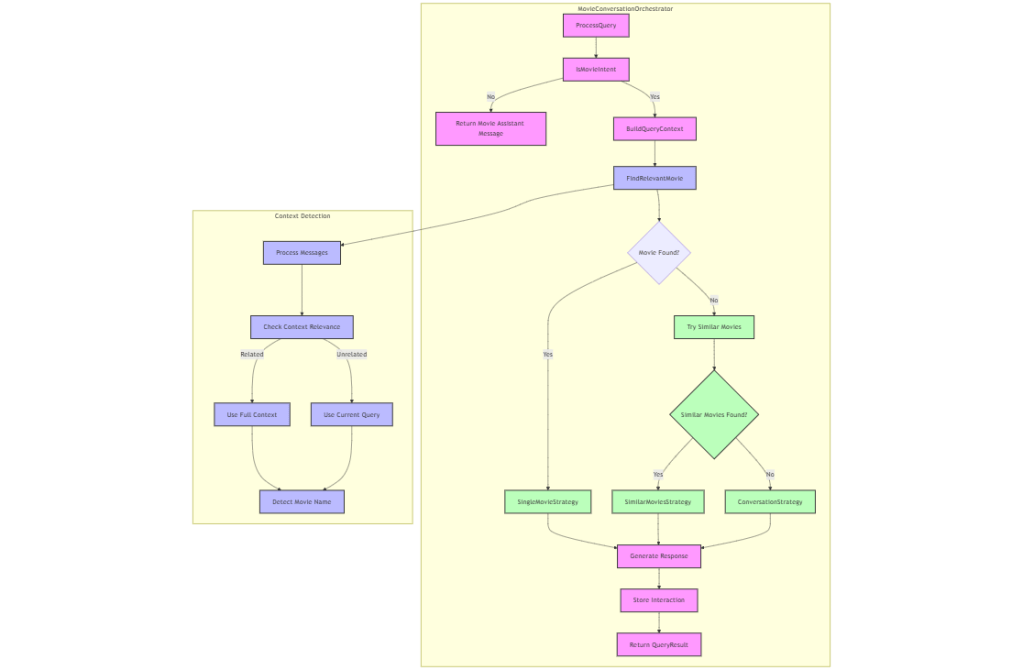
I therefore created a MovieConversationOrchestrator class that directs a user’s prompt to other specialized classes that perform the following functions:

  1. Checks if queries are movie-related
  2. Finds relevant movies from direct mentions of a movie name or context
  3. Applies different conversation strategies based on query type:
    • Single movie discussions
    • Similar movies comparisons
    • General movie conversations
  4. Maintains conversation history

Think of the MovieConversationOrchestrator as a smart movie expert that:

  • Understands when you’re talking about movies
  • Remembers your previous conversation
  • Provides relevant movie information
  • Keeps the conversation focused on movies
Figure 2. MovieConversationOrchestrator conversation flow

Orchestration was therefore a key component of the Chat API because it determines when to apply RAG and how to optimize the context window in the chat.

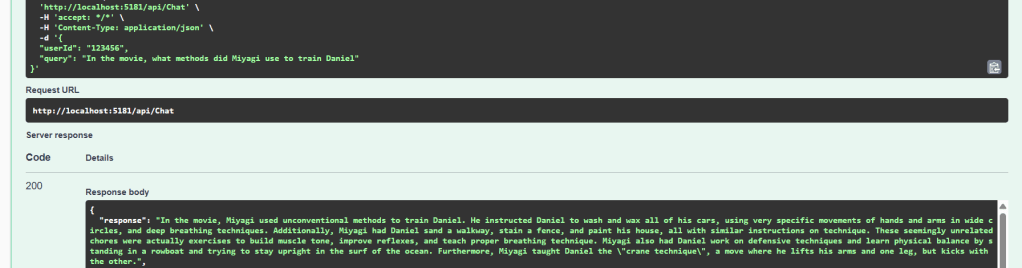
Let’s take a look at how the Chat API responds to a follow up prompt: “In the movie, what methods did Miyagi use to train Daniel

Figure 3. Chat Response based on a follow up question

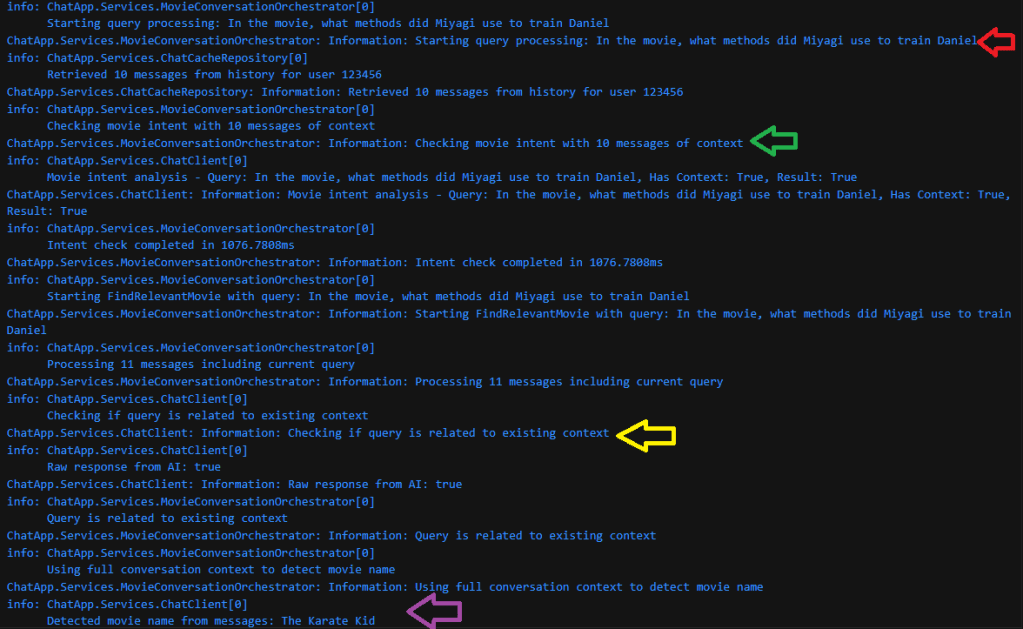
Looking at the Chat API logs we can see some of the underlying steps of the API:

Figure 4. Chat API logs showing the existing conversation being used to identify the movie name

The arrows in the above log highlight the following steps:

  1. Red Arrow: User’s query
  2. Green Arrow: The Orchestrator searching 10 prior messages of the current conversation
  3. Yellow Arrow: The system uses the AI model to confirm if the query is part of the existing conversation
  4. Purple arrow: The system detects the conversation is about The Karate Kid

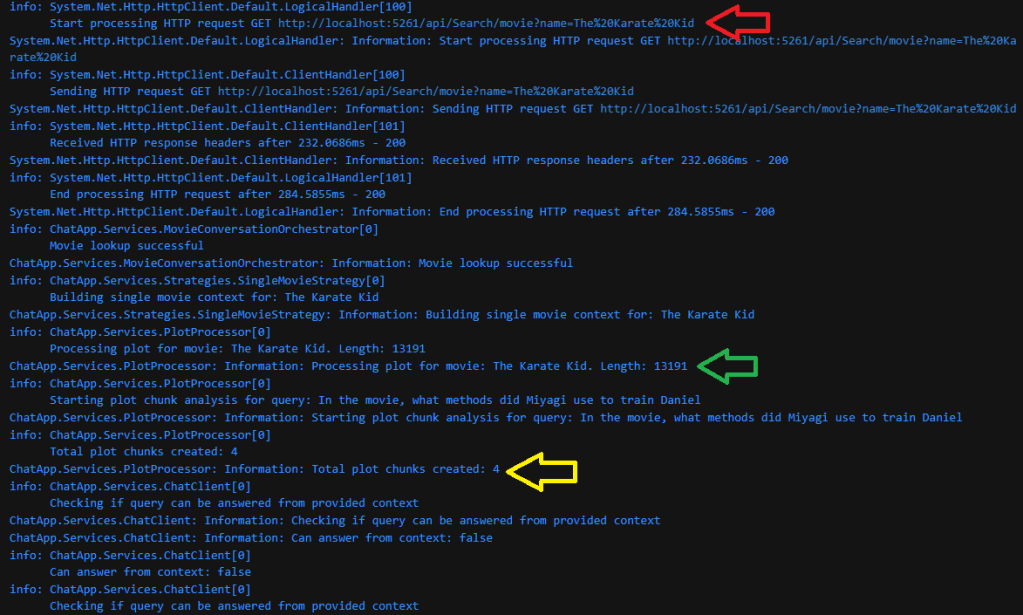
As we continue the logs, we see the next steps in the orchestration process:

Figure 5. Chat API Logs showing the movie plot being fetched and broken into 4 chunks
  1. Red Arrow: Calling the search API by the movie name to retrieve the plot data
  2. Green Arrow: Begin processing the Plot of size 13191 characters in length
  3. Yellow Arrow: The system breaks down the plot into 4 chunks

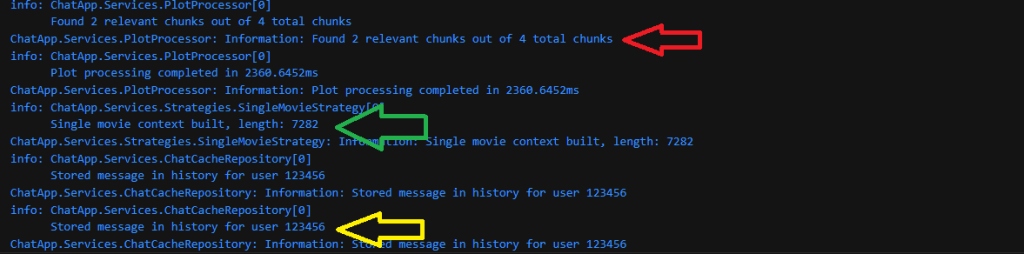
And then in the final stage of the Retrieval and Orchestration process, the chunks are processed and the conversation is saved to the conversation history:

Figure 6. Chat API logs showing chunks being processed and the user’s message being saved to the conversation history
  1. Red Arrow: The system detects 2 out of the 4 chunks as relevant
  2. Green Arrow: A context size of 7282 characters is built for the model to process (reduced from a total plot size of 13191 characters)
  3. Yellow Arrow: Finally, after the response by the model is returned to the user, the system stores the user’s message and model response (without the plot) into the cached history.

Here we can take a look at the complete Chat API Architecture:

├── 1. API Layer
│   └── Controllers/
│       ├── ChatController.cs         # Handles chat interactions
│       └── MovieController.cs        # Movie-related endpoints
│
├── 2. Core Services
│   ├── MovieConversationOrchestrator # Main coordinator of all operations
│   │   ├── Query Processing
│   │   ├── Intent Detection
│   │   └── Context Management
│   │
│   ├── ChatClient                    # AI Service Integration
│   │   ├── Movie Detection
│   │   ├── Intent Analysis
│   │   └── Response Generation
│   │
│   ├── MovieSearchService           # Movie Data Operations
│   │   ├── Movie Lookup
│   │   └── Similar Movies Search
│   │
│   └── PlotProcessor               # Plot Text Processing
│       ├── Chunk Management
│       └── Relevance Analysis
│
├── 3. Strategy Pattern
│   ├── ContextStrategyFactory      # Strategy Creation & Management
│   │
│   └── Strategies/
│       ├── SingleMovieStrategy     # Single movie context
│       ├── SimilarMoviesStrategy   # Movie comparisons
│       └── ConversationStrategy    # General discussions
│
├── 4. Models
│   ├── MovieSummary.cs            # Movie data structure
│   ├── ChatMessage.cs             # Message structure
│   └── QueryResult.cs             # API response format
│
├── 5. Interfaces
│   ├── IChatClient.cs
│   ├── IMovieSearchService.cs
│   ├── IContextStrategy.cs
│   └── IMovieConversationOrchestrator.cs
│
├── 6. Utilities
│   ├── MoviePlotChunker          # Text chunking utility
│   └── LoggingExtensions         # Logging helpers
│
└── 7. External Services Integration
    ├── Azure OpenAI              # AI processing
    └── Movie Database            # Movie data source

To take a look at the full codebase please visit: https://github.com/ShashenMudaly/RobotoChatProject/tree/master/RobotoAPI

As we can see the process of managing a conversation with a Large Language Model is an intricate one and I take my hat of to the Chat systems out there that have perfected this process. It is also worth noting that there are frameworks like LangChain and Microsoft’s Semantic Kernel (which I’m hoping to delve into further in future) that help with the orchestration flow by eliminating the need to write this code out by hand. Despite some of the struggles I describe in this post, it was a great learning experience to see how to apply a basic RAG strategy to reduce the context window. I can see myself refactoring the strategy to applying Semantic RAG chunking at a later stage which would help to further reduce the relevant chunks by first grouping sentences according to their semantic connection to each other.

Please join me on my next post where we integrate this new Chat API with Chatbot interface that borrows its name from another 80s hit song.

And finally before I say good night, let’s cue up an 80’s favorite and the inspiration for this post’s title:

Don’t Stop Believin‘” is an iconic hit single by American rock band Journey, released in 1981 as the lead single from their album Escape. Written by band members Jonathan Cain, Steve Perry, and Neal Schon, the song was inspired by the themes of hope and perseverance amid everyday struggles. It peaked at number nine on the Billboard Hot 100 and has since become one of rock’s most enduring anthems. Its appeal was further amplified by high-profile appearances in television shows such as The Sopranos and Glee, as well as in numerous films and commercials. In the digital age, “Don’t Stop Believin'” continues to thrive—garnering millions of streams on platforms like Spotify and Apple Music—cementing its status as a timeless cultural phenomenon and one of the best-selling digital tracks ever. – Source: ChatGPT

Journey’s Escape Album cover

Hey! Teacher! Leave AI Alone! – Sal Khan’s Brave Vision for AI in Education

DALL-E Generated Image inspired by Pink Floyd’s The Wall album cover

One of my go-to podcasts on my daily walks with Axl is “Work Lab” by Microsoft—a show that interviews various players in different organizations about AI adoption in their respective workplace. On one such walk, while listening to an episode, I heard host Molly Wood announce her guest for the day: Sal Khan, founder of Khan Academy. At first, I was a little baffled. I’d heard of Khan Academy the online learning site, but what was its founder doing on a Microsoft podcast all about AI? As the conversation unfolded, my questions were answered and I found myself increasingly drawn in by Sal’s engaging thoughts on AI. The 25-minute episode flew by, leaving me eager to hear more about the man and his mission. Almost as soon as I got home, I looked up his new book on Audible and began delving into what the mastermind behind Khan Academy had to say about Generative AI and its potential to transform the education sector.

Today’s blog post explores that transformation through the lens of Sal Khan’s groundbreaking book, Brave New Words: How AI Will Revolutionize Education (and Why That’s a Good Thing). Khan’s visionary perspective reimagines education’s not as a rigid, one-size-fits-all model, but as a dynamic, individualized journey where every student can learn at their own pace. By cutting through the fears and controversies surrounding AI, Khan shows us how technology can empower both learners and educators, turning potential disruption into an opportunity for profound change.

As Sal’s humble but thoughtful narrative accompanied Axl and I on our daily routine, I recognized the parallels between how Generative AI was impacting the education sector and my own Software Development Industry. Was AI destined to replace educators the way so many say it will replace Software Developers? Sal Khan leads his audience away from the fear of the unknown and closer to the idea that AI is a gift which if used correctly will give us the opportunity to solve some of the greatest challenges in democratizing education across geographical, economic and social barriers.

As I thought more of some of those challenges Sal describes, my mind drifted to the message in Pink Floyd’s Another Brick in the Wall, which, as you well guessed, is what I reference in the title of this post.

Introduction: A Call for Individuality

Roger Waters’ classic “Another Brick in the Wall” resonated deeply with generations because it captured the stifling nature of an education system that prized conformity over individuality. The song’s imagery—the oppressive classroom, the relentless marching hammer, and the metaphorical “brick” that each diminishing experience felt by a student in a classroom added to a wall of isolation—reflected a time when students were molded into uniformity. Those who deviated, who thought differently, or simply didn’t fit the conventional mold, often found themselves on the fringes.

Modern Education: Challenges Across Continents

Fast forward to today, and while the education landscape has evolved, many challenges remain. Having a spouse who is a teacher, I’ve witnessed this firsthand through two very different lenses. In South Africa where we were born and where she first became a teacher, public schools are often underfunded and educators wrestle with limited resources, overcrowded classrooms, and outdated materials. These hurdles make it incredibly tough to address each student’s unique needs. On the flip side, in Canada’s well-funded, modern schools (where she now teaches), the challenges are less about resources and more about numbers. Even with state-of-the-art infrastructure, a single teacher is hard-pressed to tailor instruction to the diverse needs of every student.

Despite these differences, a common thread runs through both systems: the struggle to provide truly individualized learning.

Who is Sal Khan?

Sal Khan is the founder of Khan Academy, a nonprofit educational platform that has democratized learning for millions worldwide. His journey began with a simple goal: to provide free, high-quality education to anyone, anywhere. The seed of that journey, though lay elsewhere, when he began helping his cousins with their math homework over the telephone. Because of the distance between each other, he began lessons over the phone, then via Skype video calls and finally, by uploading some videos on a YouTube channel and linking them to a website he made. He needed a name for the channel and his site and more in a tongue in cheek manner, Sal chose the name Khan Academy. He soon added quizzes to measure students progress and after more people started using his site, Mr. Khan made a decision one day to turn Khan Academy into a nonprofit organization. It wasn’t long before he took the plunge by leaving a comfortable hedge fund position to run Khan Academy full time.

While video-based learning sites are a common place in 2025, when Khan academy was founded in 2008, just 2 years after the launch of YouTube, Khan’s idea of an online learning platform was groundbreaking. Khan’s ability to predict where the tech world was heading did not even begin there. In 1999 at the age of 22, when asked by the magazine Computer World on what the tech world could expect in the near future, Sal’s response almost pinpoints the moment we are in today. His thoughts on online advertising and personalized data were as follows:

…That would allow for perfect marketing. “You wouldn’t mind seeing ads, because they would be ads for things you were [already] thinking about buying and would probably [anticipate and answer] all the questions you have about the product.”

Along the same line of reasoning, the data could be used to dynamically produce personalized text or video. “Imagine, for example, news that fills in any background information that you don’t know, or a science text that is written at exactly your level of understanding.”

“This concept of data representation can be extended even further to active data (or a software-based proxy) that could act on your behalf.”

In 10 years, you may have agents that roam the Web and perform transactions as you would have performed them yourself.

The last sentence give’s me chills each time I read it, knowing how Agentic systems have gained in popularity over the last few months.

AI: The Great Equalizer in Education

In Brave New Words, Sal tells how the breakthrough moment for Khan Academy —and indeed for all of us watching the AI revolution unfold—came in October 2022, when he was invited by Sam Altman, CEO of Open AI to try the first version of the GPT-4 model. This was around the time Chat GPT (using the GPT-3.5 model) was about to be released to world and Sal was some of the few chosen by Open AI as a means to lessen the public’s initial fears about AI. In the process he became one of the first 20 people in the world to experiment with GPT-4.

Despite its limitations, GPT-4 fired up Khan’s imagination on the many possibilities that generative AI could drive forward education in a way our current platforms simply could not. Sal talks in depth about what was first described by Educational psychologist Benjamin Bloom in 1984 as the 2 Sigma problem in education. In other words children would improve their levels of learning by 2 standard deviation measurements if they had access to one-on-one tutoring . This early access GPT-4 paved the way for Khan Academy to develop KhanMigo, an innovative chat system that redefines how students interact with technology in the following key ways:

• Socratic Interactivity: KhanMigo is designed to simulate a Socratic dialogue, prompting students with questions that encourage deeper understanding rather than spoon-feeding answers.

• Long-Term, Adaptive Learning: By leveraging GPT models, KhanMigo adapts to each student’s learning journey, tracking their progress over time. This not only supports self-paced and individualized learning but also helps educators distinguish between genuine research efforts and mere plagiarism.

As the world reacted to the release of ChatGPT, with students globally embracing it and teachers beginning to find the lines between plagiarism and AI generated content more and more difficult to discern, ChatGPT and AI in general became infamous in school districts and universities. This notion lead to the technology being banned in many of these settings. Khan acknowledges the plagiarism issues exist but invites us to consider some fantastic ideas that Khan Academy has implemented in KhanMigo to solve this problem. Driven by AI’s ultimate potential, Khan comes to believe that these initial concerns and limitations are temporary and can ultimately be overcome. I’ll leave you to enjoy the book and find out more about his ideas.

While the book covered individualized learning in general, it did not delve deeply into how Generative AI can support students with learning difficulties. Many of these students go years without a formal diagnosis, and even those who are diagnosed often struggle within inclusive school systems. This is sometimes due to the selection and application of key classroom adaptations being left to the discretion of educators. At other times, determining the best circumstances in which to apply these adaptations can be challenging.

Generative AI stands as our best hope for applying learning adaptations in the classroom, dynamically adjusting them based on the content of the learning material. It stands to reason that these AI systems could also help identify different learning challenges early on, providing valuable feedback to experts in formulating a diagnosis.

In the coming years, it would be great to see KhanMigo and other Generative AI tools play a greater role in improving learning in these specialized areas. Even in its current state, this technology has the potential to offer incremental value in supporting students with learning difficulties.

A Message of hope to Software Developers

For those of us in the software industry, Sal Khan’s open-minded and optimistic approach to AI offers a valuable lesson: by ignoring the noise about what AI can and cannot do, we can perhaps find AI’s value in unlocking limitations we currently have in our day to day approaches to building systems.

Brave New Words is a must-read, as it cuts through controversy and fear, offering a vision where AI is not a threat but a transformative ally in education and beyond.

And before I say goodbye, it’s time to cue up Another Brick in the Wall:

Another Brick in the Wall (Part 2)” marked a turning point in rock music with its unprecedented chart success and equally fervent controversy. Topping charts around the globe, this track became one of the best-selling singles of its time, capturing the attention of millions with its catchy yet defiant chorus. However, its anti-establishment message—especially its scathing take on rigid educational systems—sparked debates and even censorship in some regions, as authorities grappled with its bold criticism of conventional schooling. The blend of massive commercial triumph and contentious public discourse solidified the song’s legacy as both a chart-topping hit and a cultural flashpoint, embodying Pink Floyd’s unapologetic stance against conformity. – Source: Chat GPT

Grab that cache with both hands and make a stash-Delving into Redis Cache

DALL-E generated image inspired by Pink Floyd’s Dark Side of the Moon album cover

In my last post, we dove into the intricacies of integrating Azure AI Translator into the BONO Search system—showing how language detection and dynamic translation can bridge communication gaps and expand a single-language design into a multilingual experience. After grappling with throttled translation requests due to Azure’s quota limits, I also began to notice another inefficiency: repeatedly translating the same large movie plot descriptions during UI testing. This led me to a familiar challenge in cloud architectures—redundant API calls not only add latency but also inflate costs.

This blog post references an iconic lyric from Pink Floyd’s Money, “grab that cash with both hands and make a stash.” While the song isn’t about caching per se, I thought it was a fun way to play with the idea of building a stash (using Redis cache) to save money by reducing unnecessary translation calls. In this post, we’ll explore how integrating a caching layer can seamlessly optimize our architecture—ensuring every translation request is as efficient and cost-effective as possible.

The first step in setting up this change was to setup an Azure Cache for Redis resource in my resource group through the Azure Portal. The setup was pretty straight forward but there were a few gotchas on the free tier that I had to overcome:

  1. Private by Default:
    • The resource is private by default, and the portal doesn’t offer an option to make it public. I struggled a bit with ChatGPT for a workaround but eventually found a solution on Stack Overflow that involved running a CLI command to enable public network access. Remember, it’s crucial to restrict access to your IP address range via the portal for security.
  2. Debugging Challenges:
    • The free tier doesn’t provide an easy way to view cache content, which initially made debugging tedious—especially when verifying that my code was saving data to the cache. Once I implemented a read operation, I could finally check the results of my initial saves.

Design Considerations for Integration

With the Azure resource in place, the next step was integrating the Redis endpoint into the search input and translation workflows. I considered two approaches:

Integrating Redis Directly into the React Client:
One option was to introduce the Redis library into the React client, enabling the SearchForm component to directly save and retrieve values from the cache. While this approach would work, it’s a similar problem to what I encountered in my previous post. In other words the approach tightly couples the UI components to our cloud infrastructure.

This tight coupling means that if we ever decide to change our caching provider—whether switching to a different Azure resource or another cloud provider—we’d be forced to refactor the React UI.

Embedding Redis into the MAW API:
Another option was to integrate the Redis library directly into the Multilingual Autodetection Wizard (MAW) API, effectively incorporating caching into the translation flow. At first, this seemed like a natural fit and a simpler solution.

However, after further consideration, I decided against it. The challenge here was that cache entries would be indexed by movie names, while the Translation API is designed to be agnostic—it isn’t aware of the context of what it’s translating (such as movie plots). Its generic design makes it reusable for various translation tasks, so embedding caching logic here would compromise that flexibility..

Ultimately I concluded that introducing a new API—dubbed the Floyd Translation Cache Service—was the best approach to manage interactions with the Azure Cache for Redis resource. This design not only isolates the caching logic from the UI and translation service but also ensures that our architecture remains modular and flexible for future changes.

Here is how the new API fits into the Search and Translation workflow:

Figure 1. Plot Translation flow with the new Cache Service(click the image to enlarge)

The Floyd Translation Cache Service

The API itself has 2 basic endpoints:

Save a Movie Plot:

Endpoint:

POST /api/TranslationCache/save-movie-plot
Content-Type: application/json

{
  "movieName": "string",
  "languageCode": "string",
  "translatedPlot": "string"
}

Implementation:

        public async Task SaveTranslation(string movieName, string languageCode, string translatedPlot)
        {
            _logger.LogInformation("Starting SaveTranslation for movie: {MovieName}, language: {LanguageCode}", 
                movieName, languageCode);
            var startTime = DateTime.UtcNow;

            var db = _redis.GetDatabase();
            string key = GenerateKey(movieName, languageCode);
            
            // This will automatically overwrite if the key exists
            await db.StringSetAsync(key, translatedPlot);

            var duration = DateTime.UtcNow - startTime;
            _logger.LogInformation("Completed SaveTranslation in {Duration}ms", duration.TotalMilliseconds);
        }

Retrieve a Movie Plot:

Endpoint:

GET /api/TranslationCache/get-movie-plot?movieName={movieName}
   &languageCode={languageCode}

Implementation:

        public async Task<string?> GetTranslation(string movieName, string languageCode)
        {
            _logger.LogInformation("Starting GetTranslation for movie: {MovieName}, language: {LanguageCode}", 
                movieName, languageCode);
            var startTime = DateTime.UtcNow;

            var db = _redis.GetDatabase();
            string key = GenerateKey(movieName, languageCode);
            
            var translation = await db.StringGetAsync(key);

            var duration = DateTime.UtcNow - startTime;
            _logger.LogInformation("Completed GetTranslation in {Duration}ms", duration.TotalMilliseconds);
            
            return translation.HasValue ? translation.ToString() : null;
        }

These endpoints leverage the StringSetAsync and StringGetAsync methods provided by the StackExchange.Redis client, ensuring efficient storage and retrieval of translated movie plots.

Integration with the React UI

After thoroughly testing the API, I integrated the Floyd Translation Cache Service with the React Search Form component. The following code snippet illustrates how the cache is utilized in the translation workflow:

// Translate plots back to the detected language if it's not English
      const translatedResults = (await Promise.all(
        results.map(async (item) => {
          let translatedPlot = item.plot;
          if (languageResult.language !== 'en' && languageResult.language !== 'unknown') {
            // Try to get cached translation first
            const cacheService = new CacheService();
            const cachedTranslation = await cacheService.getTranslatedPlot(item.name, languageResult.language);
            if (cachedTranslation) {
              translatedPlot = cachedTranslation;
            } else {
              const plotTranslation = await languageService.translateText(item.plot, 'en', languageResult.language);
              if (plotTranslation) {
                translatedPlot = plotTranslation.translatedText;
                await cacheService.saveTranslatedPlot(item.name, languageResult.language, translatedPlot);
              }
            }
          }

The code above references a new CacheService class that handles the HTTP calls to the caching endpoints. This service first checks for a cached translation of the movie plot and uses it if available; otherwise, it makes a fresh call to the translation service, then saves the new translation result into the cache for future requests.

Demonstrating the Caching Mechanism

In the video below, you can see the caching mechanism in action with a Spanish search query. On the left is the browser window showing the search screen and its console output, while the right displays the Floyd service’s log output.

Video: The Translation cache in action

During the initial search, we observe the following:

  • The Client side code logs a “not found” result in the browser when the Floyd Translation Cache returns no result,
  • The Client code also reports a “Cache miss for RoboCop” message followed by a “Save successful for RoboCop” message —indicating that the newly translated Spanish plot for RoboCop has been cached.
  • On subsequent searches with the same language (Spanish), the service logs a “Cache hit for RoboCop”

Simultaneously, the Floyd Translation Cache API logs mirror these events by showing the corresponding GetTranslation and SaveTranslation calls.

Conclusion

Integrating the Floyd Translation Cache Service addresses the challenges of redundant API calls and excessive latency in our translation workflows. By decoupling caching from both the UI and translation services and leveraging Azure Cache for Redis, I developed a modular and scalable solution that reduces operational costs while enhancing performance. Take a look at the code for the Floyd Cache Translation Service in my GitHub repo here and the React frontend changes here.

I’m pretty certain the approach will be reused upcoming projects and I look forward to sharing the next build with you…

And now, it’s time to Cue the next track…

Money” is a standout track from Pink Floyd’s 1973 album The Dark Side of the Moon. Known for its distinctive bassline and unique sound effects—including the iconic cash register noises—the song offers a satirical take on wealth, greed, and consumerism. Its innovative production and incisive lyrics have made it one of the band’s most enduring and influential pieces. -Source ChatGPT

Original album cover for Dark Side of the Moon