

In my two-part blog series a few weeks ago, we first explored a semantic search system, where I used Azure Database PostgreSQL and uploaded a collection of approximately 4,000 movies into a database table. I then leveraged PGVector to vectorize the movie plots for each movie and built an API to search the database using lexical, semantic, and hybrid search methods. In a follow-up post, I demonstrated an example using Azure Cache for Redis. These posts were really important building blocks I would need for what I planned to build next—my very first AI chatbot.
Initially, I envisioned a more sophisticated and fun chatbot. I wanted that chatbot to be a component of a larger application so could I could learn how to really integrated the bot with application data. That may still be a longer term objective but there are elements of a chatbot architecture I would still need to learn and understand, at least from a practical point of view. Instead I decided to try and reuse what I already had and since I already had a database of movies with vectorized plots, it made sense to start with a Movie Expert Chatbot—one that could hold conversations about various movie plots from my dataset.
Building a chat interface for an OpenAI model is arguably the easier part of the task, and I will cover the interface design in an upcoming post. What I wanted to focus on first was applying Retrieval-Augmented Generation (RAG) techniques to the OpenAI model and experimenting with integrating custom data into its context.
What is RAG, and Why is it Important?
A Large Language Model (LLM) can often be considered a black box—we don’t necessarily know, nor do we need to know, its internal workings. What truly matters is that it receives human-readable input and generates relevant responses.
While we now have multimodal models that can generate images, audio, and video (e.g., DALL-E converts text into images), for the sake of this explanation, we will focus on single-modality models—those that process and generate only text.
During training, models ingest a large corpus of data to develop an internal neural network representation of the material. This is similar to how a human student progresses through different levels of schooling before graduating from university. However, just like a student’s knowledge is based on the textbooks available at the time of their studies, an AI model’s training data is static and limited to a specific point in time.
To illustrate this, imagine a Computer Science student who has recently graduated. Their knowledge of programming, databases, and operating systems is limited to what was available in their university textbooks. Their learning has been theoretical and often abstract. When this graduate enters the job market, they soon realize that technology has evolved, best practices have changed, and new programming languages have emerged.
At this point, they have two choices:
- Go back to university for additional training—this would expand their conceptual understanding, but it is time-consuming, costly, and impractical for most real-world scenarios.
- Apply their existing knowledge while supplementing it with additional context relevant to their work—such as consulting books, documentation, or online resources. This allows them to fill in knowledge gaps on demand, making them more effective without requiring formal retraining.
Similarly, LLMs face the same challenge. There are two main ways to enhance their knowledge:
- Retraining (or fine tuning) the model with additional data, resulting in a new version of the model with expanded understanding. However, like going back to university, this process is expensive, time-consuming, and computationally intensive.
- Retrieval-Augmented Generation (RAG)—instead of retraining the model, we fetch relevant external data dynamically and append it to the user’s prompt. This allows the model to apply its existing conceptual understanding while incorporating current and context-specific information, enabling more accurate and informed responses.
This approach expands the model’s generative results by dynamically retrieving supplementary knowledge for the model to reference. The primary benefit of RAG isn’t just keeping the model’s knowledge current—it is also valuable for domain-specific applications where industry expertise is required but was not part of the model’s original training data.
Basic Retrieval-Augmented Generation Workflow
A simplified RAG workflow consists of the following steps:
- User submits a query (prompt).
- The system evaluates the prompt and derives a search query.
- The system searches a data store, using either semantic, lexical, or hybrid search approaches.
- Relevant data is retrieved and appended as additional context to the prompt.
- The AI model processes the enriched prompt and generates a final response.
Of course, in a real-world chatbot implementation, many additional steps and optimizations are necessary. However, for now, we will stick to these five fundamental steps to establish a foundation for further discussion. Here is how that flow would look:
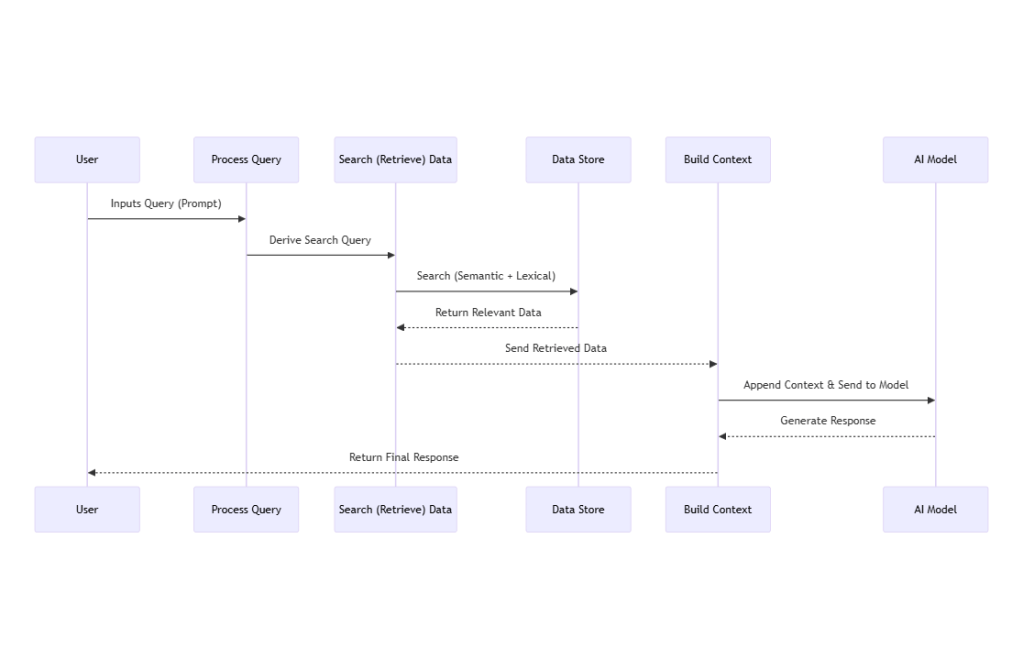
With the basic architecture above in mind, I started building out the Chatbot API by following these steps:
- Deploy a GPT model using Azure Open AI (a.k.a. Azure Foundry Portal):
- Create an Azure Open AI resource
- Select and deploy a model from the Open AI model catalog (I initially chose GPT-4o-mini)
- Save the API endpoint and key for later access
- Setup an API to interact with the Azure Open AI Model’s endpoint
- Create an ASP.net API
- Add the Azure.AI.OpenAI package to the project and instantiate a OpenAIClient instance (referencing the API endpoint and key)
- Setup an HTTP Client to make calls the BONO movie search service
- Wire up the result from BONO search service into the model context
- Wire up the OpenAIClient to direct the user’s query and context as a prompt to the Open AI model instance from step 1.
Model selection is region specific so I went with the cheapest available model in the east us region, GPT-4o-mini. Pricing of a model is based on completions which is the number of input tokens the model receives and number of output tokens the model returns combined.
Building the Prompt
Using movie plots as my RAG context source did come with one downside. As these movies may already be known to the model internally, I had to ensure the model did not use its own training to answer the movie related prompts and rather used only what returned from the BONO search API. Not doing so may give the false impression that the model’s response was derived from the dynamically retrieved context data but instead could have been auto generated by the model. The model would therefore return a seemingly valid response even if the context was empty or incorrect. Here is how the Chat Client was set up (note the ChatRequestSystemMessage ):
 var response = await _client.GetChatCompletionsAsync(
            new ChatCompletionsOptions
            {
                DeploymentName = _deploymentName,
                Messages = {
                    new ChatRequestSystemMessage(
                        "You are a movie assistant. ONLY use the provided context to answer questions. " +
                        "If the context doesn't contain enough information to answer, say so. " +
                        "Do not use any external knowledge or training data. " +
                        "Context: " + context),
                    new ChatRequestUserMessage(query)
                },
                Temperature = 0.7f,
                MaxTokens = 500
            });
In this snippet, we set up our Chat Client to ensure the model uses only the dynamically retrieved context from the BONO search API rather than relying on its pre-existing training data. Here’s what’s happening step by step:
- Sending the Chat Request:
We call the asynchronous methodGetChatCompletionsAsyncon our OpenAI client instance (_client). This sends the chat request to the model. - Configuring the Request Options:
Within theChatCompletionsOptionsobject, we specify important parameters:- Deployment Name:
TheDeploymentNameparameter identifies the specific GPT model deployment (in our case, GPT-4o-mini). - Message Setup:
Two messages are defined:- A system message instructs the model that it’s acting as a movie assistant. It emphasizes that the model should ONLY use the provided context to answer questions and, if the context is insufficient, it should indicate so. This prevents the model from drawing on its built-in training data.
- A user message contains the actual query, ensuring the model processes the question alongside the specific context.
- Controlling Creativity and Response Length:
TheTemperatureis set to 0.7, striking a balance between creativity and consistency, whileMaxTokenslimits the length of the generated response to 500 tokens.
- Deployment Name:
Below is a screenshot of the Chat API endpoint after submitting a prompt: What is the movie where a boy learns karate to defend himself from bullies
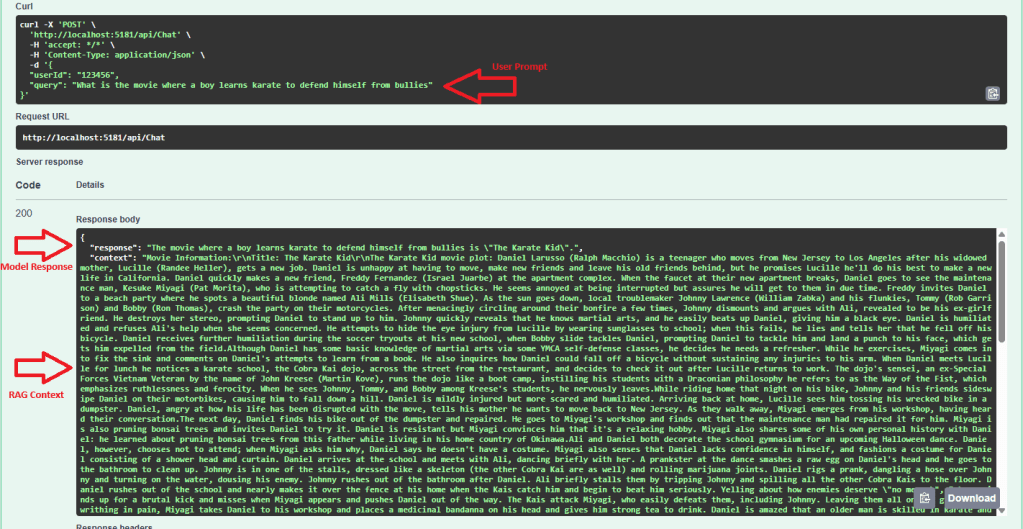
I included the context in the return response so we confirm the model is using the plot data returned from the BONO Search service.
While this was a good milestone to have reached, the API at this point is far from complete. Here are the limitations:
- No Context Window:
The API did not maintain a context window. If I asked a follow-up prompt to the initial one, the API would perform another hybrid search on the plot data. For example, if my second prompt was “Who played the main character?”, the system would search for a movie in the database with a plot related to that prompt instead of examining the plot of The Karate Kid and returning the correct answer. - Inability to Identify Movie Names:
The API did not recognize movie names in the user’s prompt. For instance, if the prompt was “Tell me about the plot for the movie The Karate Kid“, rather than looking up the movie by name, extracting its plot, and then returning a summary, the API would attempt a semantic search based on the entire prompt. This process is inefficient, and the results were unpredictable. - Handling Non-Movie Prompts:
If the user’s prompt was not related to movies, the API would still try to process it by calling the BONO Search API.
In the next post, I’ll explore the strategies I used to overcome these challenges and share the new obstacles I encountered with RAG and the GPT model I chose.
 HeadPhone Coder